Install Django on CyberPanel and Openlitespeed with WSGI
- Step 1 : Install LiteSpeed Implementation of WSGI
- Step 2 : Create site:
- Step 3: Create Virtual Environment
- Step 4: Install Django
- Step 5: Create Django Project
- Step 6: Modify Django settings
- Step 7: Create context in OpenLiteSpeed
- Step 8: Verify Django Installation
The setup is with virtual environment.
Step 1 : Install LiteSpeed Implementation of WSGI
Install Python 3 libraries required for compilation
yum update
yum upgrade openlitespeed
yum install python3-devel
yum install python3-pip
cd ~
curl -O http://www.litespeedtech.com/packages/lsapi/wsgi-lsapi-1.7.tgz
Output:
% Total    % Received % Xferd  Average Speed   Time    Time     Time  Current
                                 Dload  Upload   Total   Spent    Left  Speed
100 48997  100 48997    0     0   130k      0 --:--:-- --:--:-- --:--:--  130k
[root@mail ~]# curl -O http://www.litespeedtech.com/packages/lsapi/wsgi-lsapi-1.7.tgz
  % Total    % Received % Xferd  Average Speed   Time    Time     Time  Current
                                 Dload  Upload   Total   Spent    Left  Speed
100 48997  100 48997    0     0   135k      0 --:--:-- --:--:-- --:--:--  135k
Extract tar
tar xf wsgi-lsapi-1.7.tgz
cd wsgi-lsapi-1.7
Configure with Python 3
python3 ./configure.pyCompile
makeOutput:
gcc -pthread -Wno-unused-result -Wsign-compare -DNDEBUG -O2 -g -pipe -Wall -Wp,-D_FORTIFY_SOURCE              =2 -fexceptions -fstack-protector-strong --param=ssp-buffer-size=4 -grecord-gcc-switches   -m64               -mtune=generic -D_GNU_SOURCE -fPIC -fwrapv -O0 -g3 -I. -I/usr/include/python3.6m  -I. -I/usr/inc              lude/python3.6m  -c -o main.o main.c
In file included from /usr/include/inttypes.h:25:0,
                 from ./lsapidef.h:37,
                 from ./lsapilib.h:41,
                 from main.c:34:
/usr/include/features.h:330:4: warning: #warning _FORTIFY_SOURCE requires compiling with optimiz              ation (-O) [-Wcpp]
 #  warning _FORTIFY_SOURCE requires compiling with optimization (-O)
    ^
gcc -pthread -Wno-unused-result -Wsign-compare -DNDEBUG -O2 -g -pipe -Wall -Wp,-D_FORTIFY_SOURCE              =2 -fexceptions -fstack-protector-strong --param=ssp-buffer-size=4 -grecord-gcc-switches   -m64               -mtune=generic -D_GNU_SOURCE -fPIC -fwrapv -O0 -g3 -I. -I/usr/include/python3.6m  -I. -I/usr/inc              lude/python3.6m  -c -o wsgi.o wsgi.c
In file included from /usr/include/limits.h:26:0,
                 from /usr/lib/gcc/x86_64-redhat-linux/4.8.5/include/limits.h:168,
                 from /usr/lib/gcc/x86_64-redhat-linux/4.8.5/include/syslimits.h:7,
                 from /usr/lib/gcc/x86_64-redhat-linux/4.8.5/include/limits.h:34,
                 from /usr/include/python3.6m/Python.h:11,
                 from wsgi.c:29:
/usr/include/features.h:330:4: warning: #warning _FORTIFY_SOURCE requires compiling with optimiz              ation (-O) [-Wcpp]
 #  warning _FORTIFY_SOURCE requires compiling with optimization (-O)
    ^
gcc -pthread -Wno-unused-result -Wsign-compare -DNDEBUG -O2 -g -pipe -Wall -Wp,-D_FORTIFY_SOURCE              =2 -fexceptions -fstack-protector-strong --param=ssp-buffer-size=4 -grecord-gcc-switches   -m64               -mtune=generic -D_GNU_SOURCE -fPIC -fwrapv -O0 -g3 -I. -I/usr/include/python3.6m  -I. -I/usr/inc              lude/python3.6m  -c -o wsgiinput.o wsgiinput.c
In file included from /usr/include/limits.h:26:0,
                 from /usr/lib/gcc/x86_64-redhat-linux/4.8.5/include/limits.h:168,
                 from /usr/lib/gcc/x86_64-redhat-linux/4.8.5/include/syslimits.h:7,
                 from /usr/lib/gcc/x86_64-redhat-linux/4.8.5/include/limits.h:34,
                 from /usr/include/python3.6m/Python.h:11,
                 from wsgiinput.c:29:
/usr/include/features.h:330:4: warning: #warning _FORTIFY_SOURCE requires compiling with optimiz              ation (-O) [-Wcpp]
 #  warning _FORTIFY_SOURCE requires compiling with optimization (-O)
    ^
gcc -pthread -Wno-unused-result -Wsign-compare -DNDEBUG -O2 -g -pipe -Wall -Wp,-D_FORTIFY_SOURCE              =2 -fexceptions -fstack-protector-strong --param=ssp-buffer-size=4 -grecord-gcc-switches   -m64               -mtune=generic -D_GNU_SOURCE -fPIC -fwrapv -O0 -g3 -I. -I/usr/include/python3.6m  -I. -I/usr/inc              lude/python3.6m  -c -o wsgiwrapper.o wsgiwrapper.c
In file included from /usr/include/limits.h:26:0,
                 from /usr/lib/gcc/x86_64-redhat-linux/4.8.5/include/limits.h:168,
                 from /usr/lib/gcc/x86_64-redhat-linux/4.8.5/include/syslimits.h:7,
                 from /usr/lib/gcc/x86_64-redhat-linux/4.8.5/include/limits.h:34,
                 from /usr/include/python3.6m/Python.h:11,
                 from wsgiwrapper.c:29:
/usr/include/features.h:330:4: warning: #warning _FORTIFY_SOURCE requires compiling with optimiz              ation (-O) [-Wcpp]
 #  warning _FORTIFY_SOURCE requires compiling with optimization (-O)
    ^
gcc -pthread -Wno-unused-result -Wsign-compare -DNDEBUG -O2 -g -pipe -Wall -Wp,-D_FORTIFY_SOURCE              =2 -fexceptions -fstack-protector-strong --param=ssp-buffer-size=4 -grecord-gcc-switches   -m64               -mtune=generic -D_GNU_SOURCE -fPIC -fwrapv -O0 -g3 -I. -I/usr/include/python3.6m  -I. -I/usr/inc              lude/python3.6m  -c -o lsapilib.o lsapilib.c
In file included from /usr/include/ctype.h:26:0,
                 from lsapilib.c:35:
/usr/include/features.h:330:4: warning: #warning _FORTIFY_SOURCE requires compiling with optimiz              ation (-O) [-Wcpp]
 #  warning _FORTIFY_SOURCE requires compiling with optimization (-O)
    ^
gcc -pthread -Wno-unused-result -Wsign-compare -DNDEBUG -O2 -g -pipe -Wall -Wp,-D_FORTIFY_SOURCE              =2 -fexceptions -fstack-protector-strong --param=ssp-buffer-size=4 -grecord-gcc-switches   -m64               -mtune=generic -D_GNU_SOURCE -fPIC -fwrapv -O0 -g3 -I. -I/usr/include/python3.6m  -I. -I/usr/inc              lude/python3.6m  -c -o lsapi-glue.o lsapi-glue.c
In file included from /usr/include/limits.h:26:0,
                 from /usr/lib/gcc/x86_64-redhat-linux/4.8.5/include/limits.h:168,
                 from /usr/lib/gcc/x86_64-redhat-linux/4.8.5/include/syslimits.h:7,
                 from /usr/lib/gcc/x86_64-redhat-linux/4.8.5/include/limits.h:34,
                 from /usr/include/python3.6m/Python.h:11,
                 from lsapi-glue.c:33:
/usr/include/features.h:330:4: warning: #warning _FORTIFY_SOURCE requires compiling with optimiz              ation (-O) [-Wcpp]
 #  warning _FORTIFY_SOURCE requires compiling with optimization (-O)
    ^
gcc -pthread -Wl,-z,relro  -g -L/usr/lib64 -Xlinker -export-dynamic -o lswsgi main.o wsgi.o wsgi              input.o wsgiwrapper.o lsapilib.o lsapi-glue.o -L/usr/lib64/python3.6/config-3.6m-x86_64-linux-gn              u -lpython3.6m -lpthread -ldl  -lutil -lm
Copy lswsgi to fcgi-bin
cp lswsgi /usr/local/lsws/fcgi-bin/if existing overwrite
cp: overwrite ‘/usr/local/lsws/fcgi-bin/lswsgi’? yStep 2 : Create site:
Login to your CyberPanel Control Panel.
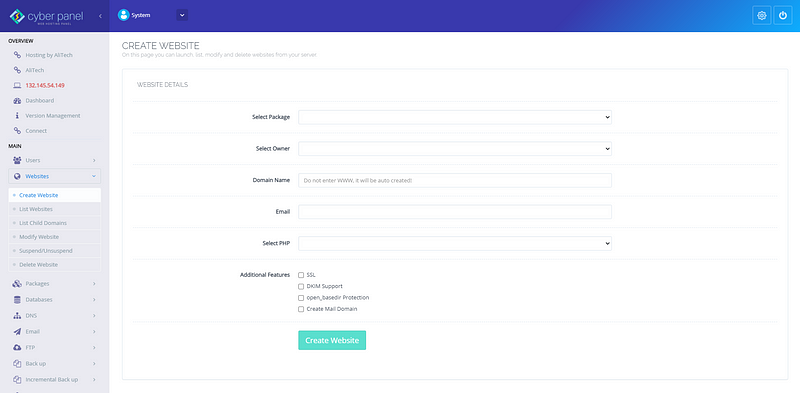
Create website, you can get a new hosting account with Openlitespeed here https://www.hostingbyalitech.com
Fill out :
Site package : default (or any other if you have)
Site owner : yourusername
Domain name : souqagora.tk (here I am using this site this will be referred throughout the tutorial.
E-mail: your e-mail
Select php : 7.3 (this will not affect but normally I choose 7.3 or as required)
and check all additional features i.e. SSL, DKIM Support, open_basedir protection, Create Mail Domain
Step 3: Create Virtual Environment
Move to your site root dir:
cd /home/souqagora.tk/public_htmlCreate virtual environment:
python3 -m virtualenv /home/souqagora.tk/public_htmlOutput :
Using base prefix '/usr'
  No LICENSE.txt / LICENSE found in source
New python executable in /home/souqagora.tk/public_html/bin/python3
Also creating executable in /home/souqagora.tk/public_html/bin/python
Installing setuptools, pip, wheel...
done.
Activate virtual environment:
source /home/souqagora.tk/public_htmlcheck python directory
which pythonIt should reflect the directory of your virtual environment:
/home/souqagora.tk/public_html/bin/pythonStep 4: Install Django
pip install djangoOutput:
Collecting django
  Using cached Django-3.1.6-py3-none-any.whl (7.8 MB)
Collecting sqlparse>=0.2.2
  Using cached sqlparse-0.4.1-py3-none-any.whl (42 kB)
Collecting pytz
  Using cached pytz-2021.1-py2.py3-none-any.whl (510 kB)
Collecting asgiref=3.2.10
  Using cached asgiref-3.3.1-py3-none-any.whl (19 kB)
Installing collected packages: sqlparse, pytz, asgiref, django
Successfully installed asgiref-3.3.1 django-3.1.6 pytz-2021.1 sqlparse-0.4.1
Step 5: Create Django Project
python3 -m django startproject souqNote: My project name is souq replace as required.
Step 6: Modify Django settings
cd souq
cd souq
nano settings.py
Change below
ALLOWED_HOSTS = []So that it should reflect as:
ALLOWED_HOSTS = ['*']and add below at the end of the file settings.py
STATIC_ROOT = '/home/souqagora.tk/public_html/souq/public/static'mentioning /public/static is required
cd..make sure you are in the below folder:
/home/souqagora.tk/public_html/souq/Use this command to make sure:
pwdcreate directory
mkdir -p public/staticCollect static files:
python manage.py collectstaticMake database migration
python manage.py migrateOutput:
Operations to perform:
  Apply all migrations: admin, auth, contenttypes, sessions
Running migrations:
  Applying contenttypes.0001_initial... OK
  Applying auth.0001_initial... OK
  Applying admin.0001_initial... OK
  Applying admin.0002_logentry_remove_auto_add... OK
  Applying admin.0003_logentry_add_action_flag_choices... OK
  Applying contenttypes.0002_remove_content_type_name... OK
  Applying auth.0002_alter_permission_name_max_length... OK
  Applying auth.0003_alter_user_email_max_length... OK
  Applying auth.0004_alter_user_username_opts... OK
  Applying auth.0005_alter_user_last_login_null... OK
  Applying auth.0006_require_contenttypes_0002... OK
  Applying auth.0007_alter_validators_add_error_messages... OK
  Applying auth.0008_alter_user_username_max_length... OK
  Applying auth.0009_alter_user_last_name_max_length... OK
  Applying auth.0010_alter_group_name_max_length... OK
  Applying auth.0011_update_proxy_permissions... OK
  Applying auth.0012_alter_user_first_name_max_length... OK
  Applying sessions.0001_initial... OK
Create super user:
python manage.py createsuperuserOutput:
Username (leave blank to use 'root'): root
Email address:
Password:
Password (again):
Superuser created successfully.
Note: Here I am creating with root user because I was having difficulties creating other users at the moment. After you create first user with root you may create other users while in Django admin.
Change folder owner:
chown -R nobody:nobody /home/souqagora.tk/public_html/souq/Step 7: Create context in OpenLiteSpeed
Login to your OpenLiteSpeed Control Panel, 7080 is the Openlitespeed Port for Control Panel:
https://hostingbyalitech.com:7080
Go to Virtual Hosts on side bar.
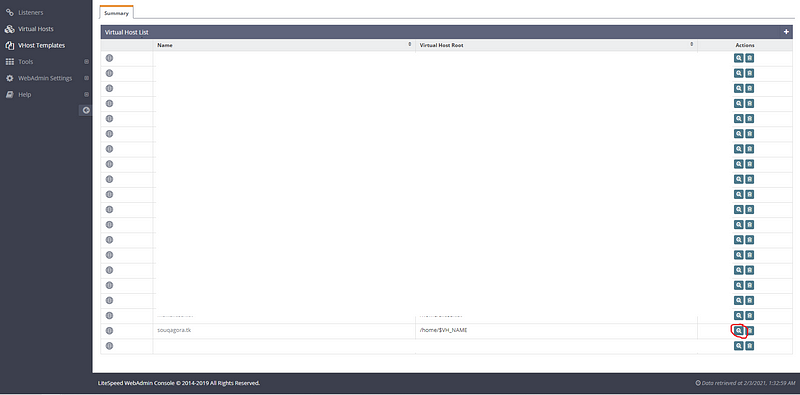
and open the virtual host configuration form above icon.
Click Context Tab.
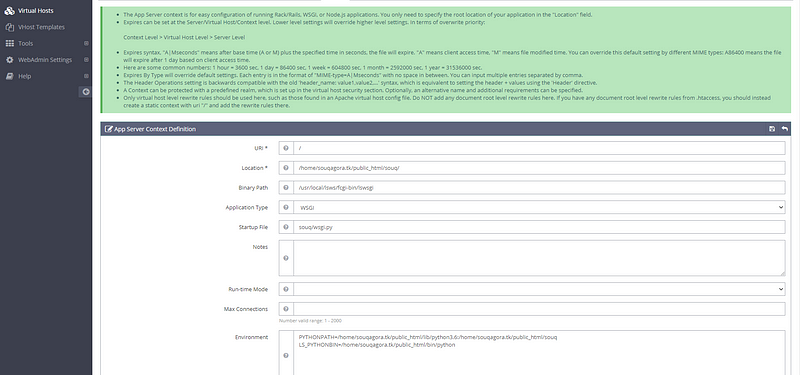
Click ‘+’ sign and add new context, select App Server as shown below:
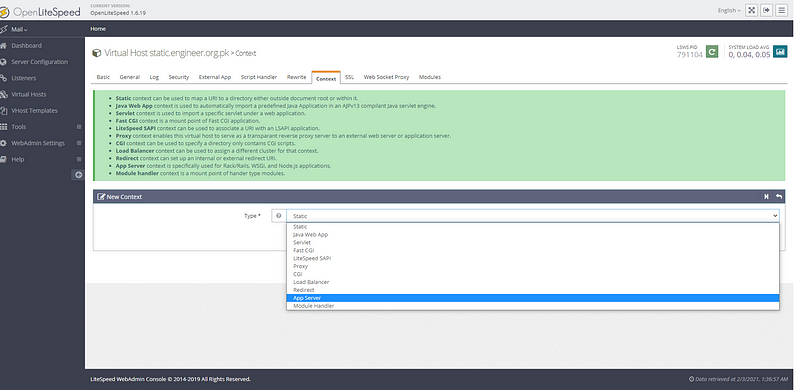
and click next.
Now fillout these details as shown:
URI * = /
Location * = /home/souqagora.tk/public_html/souq/
Binary Path = /usr/local/lsws/fcgi-bin/lswsgi
Application Type = WSGI
Startup File = souq/wsgi.py
Environment = PYTHONPATH=/home/souqagora.tk/public_html/lib/python3.6:/home/souqagora.tk/public_html/souq
LS_PYTHONBIN=/home/souqagora.tk/public_html/bin/python
Note: Make sure you have python version 3.6 otherwise check accordingly and modify above version in PYTHONPATH.
Step 8: Verify Django Installation
These links were of help but I had to struggle alot to reach to success which changes have been included in these guides:
https://openlitespeed.org/kb/python-wsgi-applications/
https://blog.cyberpanel.net/2019/01/10/how-to-setup-django-application-on-cyberpanel-openlitespeed/
Keywords:
Install, Django, on, CyberPanel, Openlitespeed, with WSGI, WSGI, Install Django, CyberPanel Django, OpenLitespeed with WSGI